Quick guide to RelFinder Reformed
|
What is it?
Relfinder reformed is a reimplementation of the now deprecated RelFinder. It is a tool for the interactive exploration and visualization of relationships between entities in RDF data. This tool will help you visualize the relationships between entities in the AgroLD knowledge base.
Interface
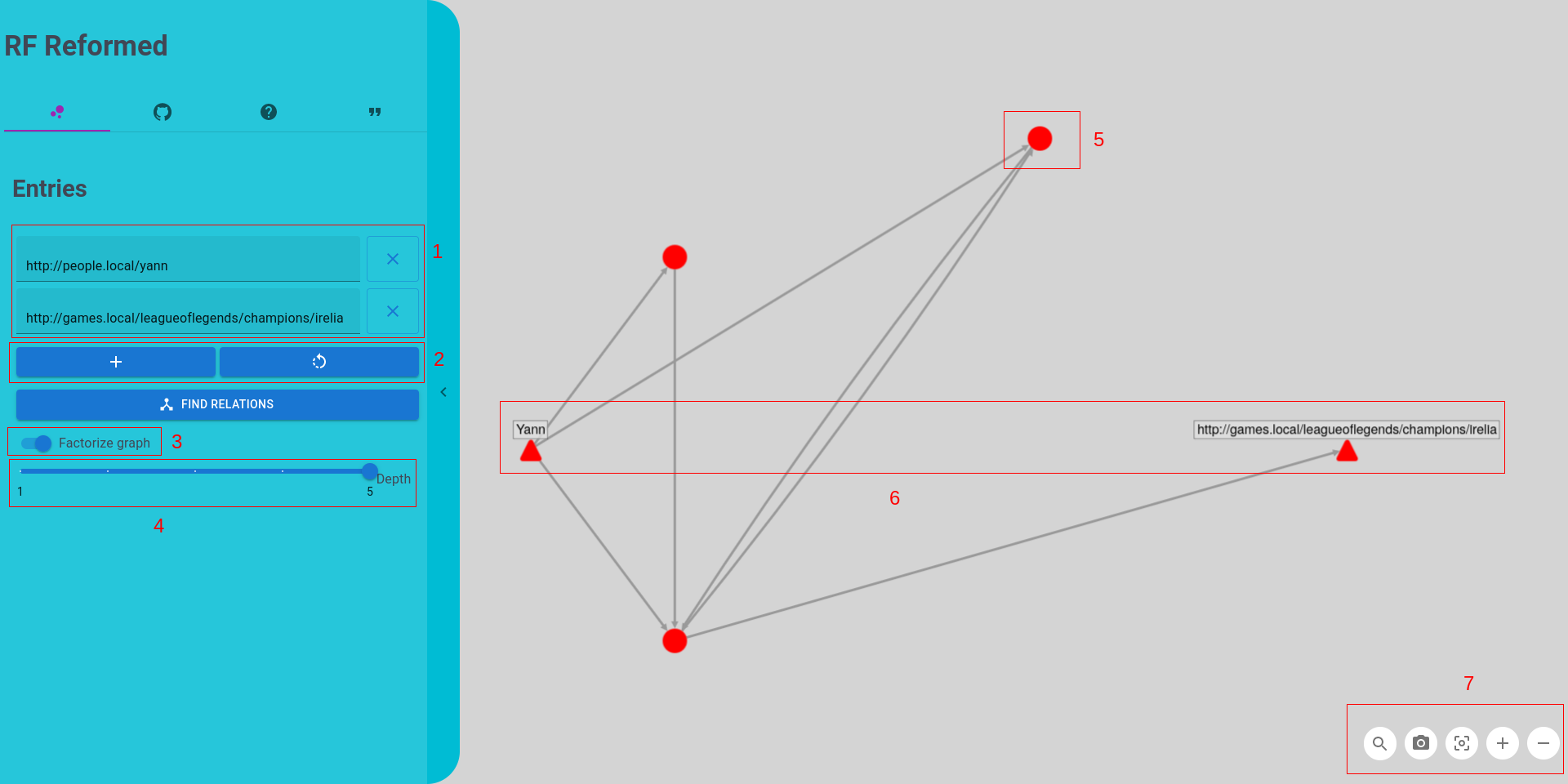
- Text inputs where you type in targetted entities, you can either type their URI or their label
- Buttons to respectively add a target entity and refresh text inputs
- Switch button that hides Litterals, you can see attributes of an entity by clicking on it
- Slider to set how long can the paths be
- An entity, you can hover on it to see its neighbors and click on it to see details
- Entities that are triangle-shaped are targeted entities, the one you typed in
-
Control buttons that allows you to (from left to right):
- Search for an entity in the graph
- Take a screenshot
- Reset the graph
- Zoom (can also be done with your scrollwheel)
- Dezoom
Links